
How to file a Best Buy warranty claim: step-by-step (2026)
Best Buy sells warranties through three different programs — manufacturer warranties, Geek Squad Protection Plans, and Best Buy Total Tech memberships — and the claim process is different for each. This guide walks through all three, the documents you'll need, the most common reasons claims get rejected, and the leverage you have when an adjuster says no.
First: which warranty applies to your situation?
Before you call anyone, identify which warranty covers your item. The customer-service approach is completely different for each.
| Type of warranty | Who handles the claim | What it covers | Typical duration |
|---|---|---|---|
| Manufacturer warranty | Manufacturer (or Geek Squad as facilitator) | Defects in materials and workmanship | 1 year (electronics), up to 10 years (appliances) |
| Geek Squad Protection Plan | Best Buy / Geek Squad | Mechanical failures, accidental damage (most plans), battery replacement | 2-5 years depending on plan |
| Best Buy Total Tech | Best Buy | Tech support across all your devices, plus protection upgrades | Annual membership ($199.99/year as of 2026) |
| Best Buy 15-day return | Best Buy (any store) | Anything: change of mind, defects, damage | 15 days from purchase (60 days for Elite Plus members) |
Path 1: Manufacturer warranty claim
If your item failed within the manufacturer's warranty period (typically 1 year for electronics), this is the path. The manufacturer — not Best Buy — is responsible for the repair or replacement. Best Buy may help facilitate, but the decision rests with the manufacturer.
What you need
- Original receipt from Best Buy showing purchase date
- Model and serial number (from the device itself or the box)
- Description of the defect — specific symptoms, when they started, what triggers them
- Photos or video demonstrating the issue (helpful for mail-in claims)
How to file
- Check the manufacturer's warranty page first. Search "[brand] warranty claim" — most major brands (Apple, Samsung, Sony, LG) have direct online claim forms.
- If the brand is Apple: Use the Apple Support app or visit an Apple Store. Apple processes warranty claims faster than any other brand.
- If the brand is unknown / smaller: Call Best Buy at 1-888-237-8289 and ask the Geek Squad team to help facilitate.
- For appliances: Many brands (Whirlpool, GE, LG) send a service technician to your home — call the manufacturer directly to schedule.
Common reasons manufacturer claims get rejected
- "Out of warranty" — they pulled up the serial number and the warranty already expired. Always know your purchase date.
- "User damage" — drops, water damage, attempted repair. Manufacturer warranties exclude these.
- "Not registered" — some brands require you to register the product with them within 30 days. Always register.
- "Receipt unverifiable" — if you bought from a third-party seller (eBay, Amazon Marketplace), the manufacturer may refuse the claim. Best Buy purchases avoid this issue.
Path 2: Geek Squad Protection Plan
Geek Squad Protection (GSP) is Best Buy's extended warranty product. It picks up where the manufacturer warranty ends and adds coverage for things manufacturer warranties don't cover — accidental damage, drops, spills, and (for premium plans) loss/theft.
Geek Squad Protection plan tiers
| Plan | Coverage | Typical price |
|---|---|---|
| Standard Geek Squad Protection | Mechanical/electrical failures, normal wear and tear, manufacturer defects after factory warranty expires | ~10-20% of item price |
| Geek Squad Protection with ADH (Accidental Damage Handling) | Above + drops, spills, cracked screens | ~15-25% of item price |
| Geek Squad Protection Replacement Plan | Direct replacement (no repair attempt) for items under ~$300 | ~10-15% of item price |
How to file a Geek Squad Protection claim
- Locate your plan number. It's on the receipt at purchase, in your My Best Buy account, or in your email confirmation.
- Gather documentation: Plan number, original receipt, item model/serial, description of issue.
- Choose your channel:
- In-store: Bring item + receipt to any Geek Squad counter. Best for quick diagnoses.
- Online: Visit bestbuy.com/services and click "File a claim". Best for products under 25 lbs that ship easily.
- Phone: 1-800-433-5778. Best when you need verbal guidance or have a complex issue.
- Diagnostic: Geek Squad will diagnose the issue (in-store: 30-60 minutes; mail-in: 5-7 days). They'll either repair, replace, or in some cases issue a Best Buy gift card for the item's current value.
- Repair turnaround: 7-14 business days typical. Major repairs can take 21+ days if parts are on backorder.
Geek Squad Protection: claim rejection reasons
- "Cosmetic damage only" — the plan covers functional failures. A scratched screen that still works is not covered unless you have ADH.
- "Improper care" — water damage to a non-waterproof device, items left in extreme heat. Document that you used the device normally.
- "Plan expired" — GSPs run for 2-5 years from purchase, not from when issues start. Always know your end date.
- "No power tested" — If your laptop won't turn on, Geek Squad needs the charger. Bring all original accessories.
Path 3: Best Buy Total Tech membership
Total Tech is a $199.99/year membership giving you tech support across all your devices (Best Buy or otherwise), plus 24/7 customer support, free shipping, and member-only protection upgrades. It's not a warranty in the traditional sense — it's a service umbrella.
What Total Tech includes
- Unlimited Geek Squad tech support (online, phone, and limited in-store)
- Free in-home setup and installation for select products
- 20% off labor on repairs and installations
- VIP member service line
- Free 2-day shipping on Best Buy.com orders
- Optional add-on protection plans at member-discounted rates
How to use Total Tech for repair/protection
Total Tech itself doesn't replace a warranty. But it dramatically reduces friction:
- Call the member-only line (number on your card or in your account)
- Get help diagnosing the issue remotely first
- If repair is needed, get the Total Tech rate (typically 20% off retail Geek Squad service)
- If the item is also covered by a Geek Squad Protection plan, the GSP claim flow takes over
The "no receipt" scenario
You'll probably need to file a claim someday and not be able to find the receipt. Here's how Best Buy handles it.
Best Buy can look up your purchase using:
- My Best Buy account (your email login)
- Credit/debit card last 4 digits (Best Buy stores tied transactions for ~3 years)
- Phone number on your account
- Email address used at checkout
This works for purchases made in the last ~3 years. Older than that, the lookup may fail and you'll need physical proof.
The fallback hierarchy:
- Original Best Buy receipt (paper or email)
- Account purchase history lookup
- Credit card statement showing the transaction
- Bank account statement
- Photo of the receipt (if you scanned it before losing the paper)
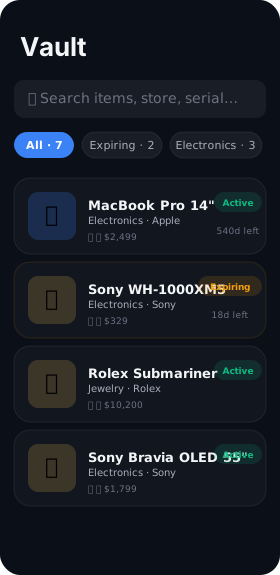
If you scan receipts at the moment of purchase using a tool like HomeProof, you skip steps 2-5 every time. The OCR'd receipt with date and total is treated as identical to the original by Best Buy and Geek Squad.
What to bring to your Geek Squad appointment
Whatever the path, showing up prepared cuts your claim time in half. Bring:
- The item with all original accessories (charger, cables, remotes)
- The original box if you still have it (helpful for mail-in shipping)
- Receipt (paper, email PDF, or HomeProof scan)
- Plan document if you have GSP or Total Tech
- A written description of the defect — specific, dated, mentions any troubleshooting you tried
- Photo evidence if the failure is intermittent
- Government ID — required for high-value claims
If your claim is rejected: the appeal path
Rejected claims are not always final. Here's the escalation order:
- In-store manager: Politely ask to speak with the store manager. Explain the issue, show your documentation. Many "no's" become "yes's" at this level.
- Best Buy Customer Care: Call 1-888-237-8289. Reference your case number. Customer Care can override store decisions.
- Better Business Bureau: File a BBB complaint. Best Buy responds to these — they have a high BBB rating they want to protect.
- Credit card chargeback: Last resort. If the item was defective from purchase and you're within ~120 days, your credit card issuer can reverse the charge.
Document every interaction: who you spoke with, when, what they said. If a dispute arises, your written record matters.
The best warranty claim is the one where you have the receipt before you start.
How to never be in this situation again
The single biggest predictor of a smooth warranty claim isn't the brand or the plan — it's whether you have the receipt and the serial number when you call. Here's the 30-second routine:
- The moment you bring something home from Best Buy, scan the receipt
- Photograph the model plate / serial number sticker
- Save both to one searchable place
- Set a reminder for 30 days before the warranty expires
HomeProof automates exactly this workflow. Apple Vision OCR runs on-device — Best Buy receipts get parsed automatically (store name, date, total, warranty term when written on receipt). The 30-day reminder fires automatically. When you actually need to file a claim, you tap once to see the full proof package.
For the bigger picture on warranty management, see our 2026 warranty playbook. For receipt retention rules across tax/warranty/insurance, see how long to keep receipts.
Frequently asked questions
Can I file a Best Buy warranty claim without the receipt?
Yes — Best Buy can look up purchases by My Best Buy account, credit card last 4, phone, or email. Works for purchases in the last ~3 years.
How long do Best Buy manufacturer warranties last?
Typically 1 year for electronics, 30-90 days for accessories, up to 10 years for major appliances. Best Buy doesn't add coverage beyond the manufacturer — that's what Geek Squad Protection adds.
What's the difference between Geek Squad Protection and Best Buy Total Tech?
GSP is per-item protection. Total Tech is an annual $199.99 membership covering tech support across all your devices, with optional protection add-ons.
How long does a Best Buy warranty claim take?
In-store: 30-60 min for diagnosis. Mail-in or depot repair: 7-14 business days. Major parts on backorder: up to 21 days.
Will Best Buy give me a refund or replacement?
Within 15 days: refund or exchange. After return window with GSP: repair first, replacement if repair fails or impossible. Manufacturer warranty: usually repair, sometimes replace, rarely refund.
Does Best Buy honor manufacturer warranties?
Geek Squad facilitates many manufacturer warranty claims. For Apple, HP, Dell, going direct is often faster.
Stop losing receipts before the next claim
HomeProof scans receipts on-device, sets warranty reminders, and stores everything in your private iCloud. Free for first 20 items.
Download on theApp Store